WhatsApp bookkeeping for South Africa

Snap a receipt.
Get clean books.

Photograph any slip and send it on WhatsApp. Snap-a-Slip reads the merchant, total, 15% VAT and date, sorts it into the right category, and files it for SARS. No app, no spreadsheets.

  • Free for 15 receipts/month
  • POPIA-compliant
  • Cancel anytime
Under a minute
From photo to filed receipt
15% VAT
Pulled out on every slip, automatically
5 years
SARS asks you to keep receipts this long. We store yours while your account is active.
See it work

From shoebox to sorted.

This is the actual product. Every screen below is what you get after you send one photo.

Step 01AI extraction

Every figure, pulled from the photo.

Send a slip and within seconds it comes back as clean data: merchant, date, total, 15% VAT, currency and category. Each field shows a confidence score, and the original photo stays attached.
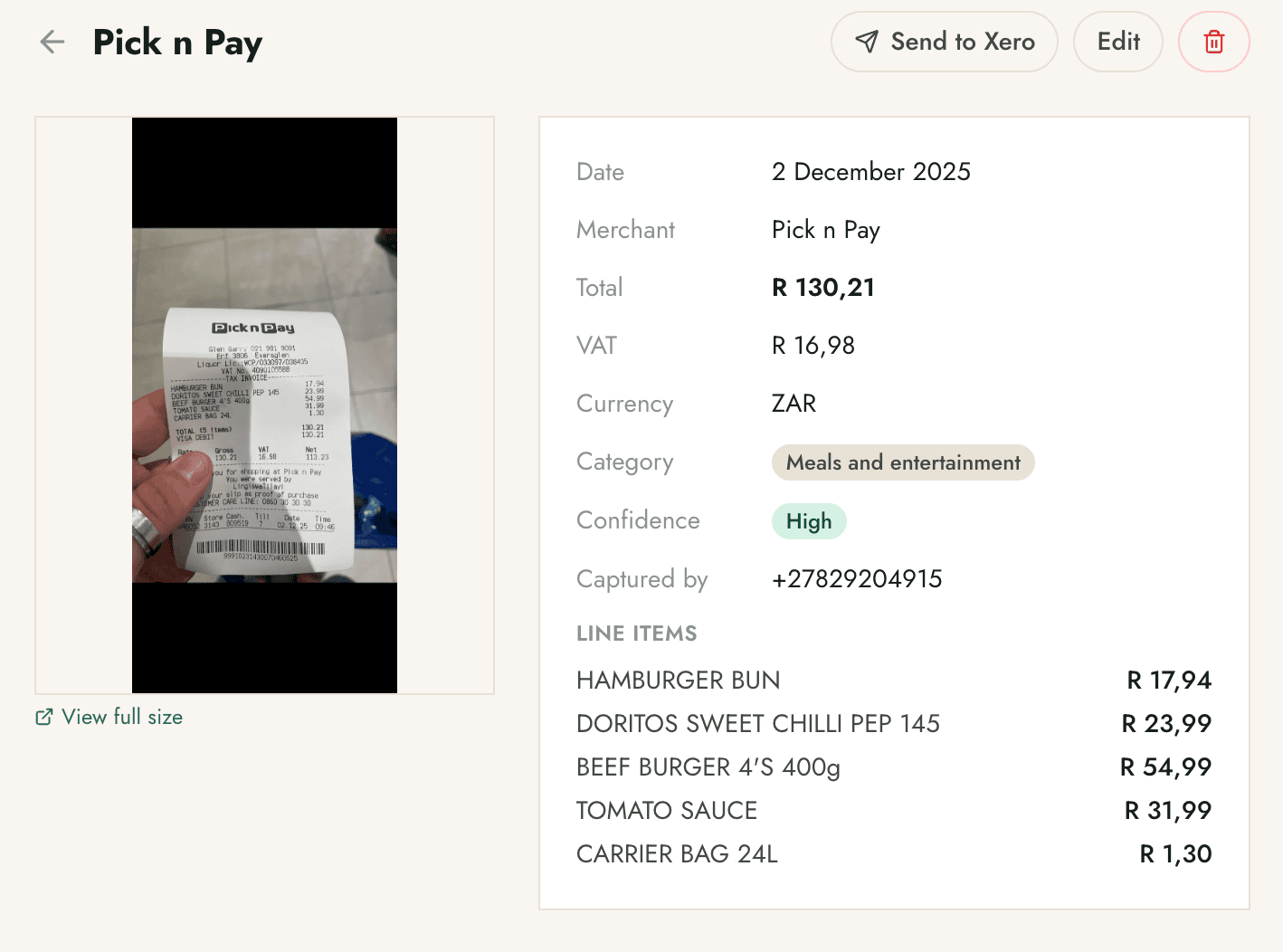
  • VAT split out. The 15% line is separated from the total, ready for your SARS return.
  • Line items captured. A grocery run with twelve lines comes back line by line, not as one lump.
  • One tap to Xero. Push a slip straight to Xero as a draft bill with the photo attached.
Snap-a-Slip dashboard showing a Pick n Pay receipt with extracted merchant, date, total R130.21, VAT R16.98, category and per-line items.
Real extraction view · merchant, VAT and line items
Step 02Auto-categorisation

It files itself, and learns from you.

Every slip lands in the right category on its own. Snap-a-Slip ships with a full set of South African categories, and when you correct one, it remembers for next time.
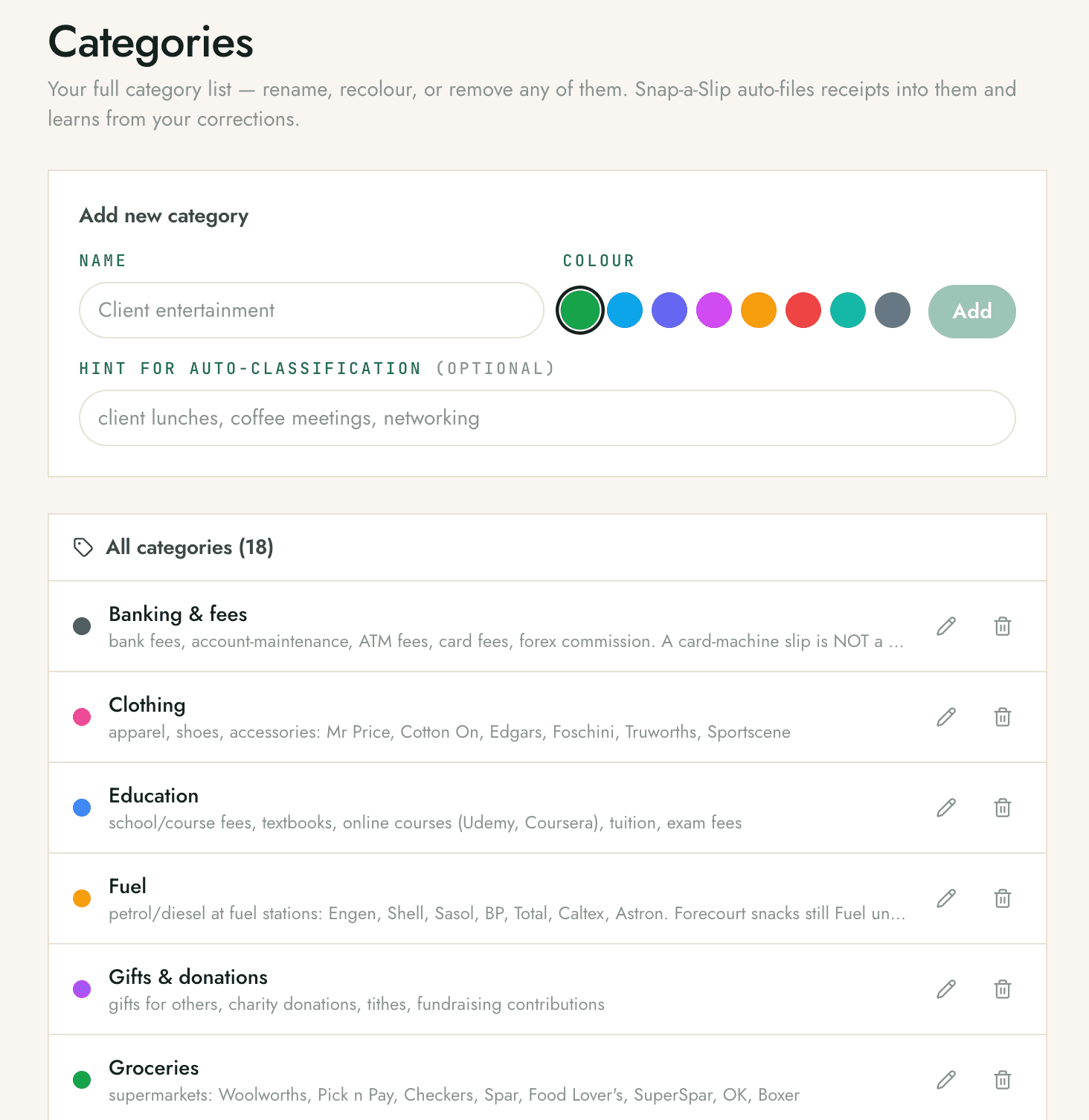
  • Built for SA. Groceries, fuel, banking fees, medical and more, with vendor hints baked in.
  • Make it yours. Rename, recolour, or add categories like "Client entertainment" in seconds.
  • Learns on correction. Move one receipt and the next from that vendor goes to the right place.
Snap-a-Slip categories screen listing 18 South African expense categories with colour tags and auto-classification hints.
18 categories out of the box, fully editable
Step 03Monthly summary

Your whole month, at a glance.

Total spend, receipt count, spend by month and spend by category, all updating as your slips come in. No spreadsheet to build, no month-end scramble.
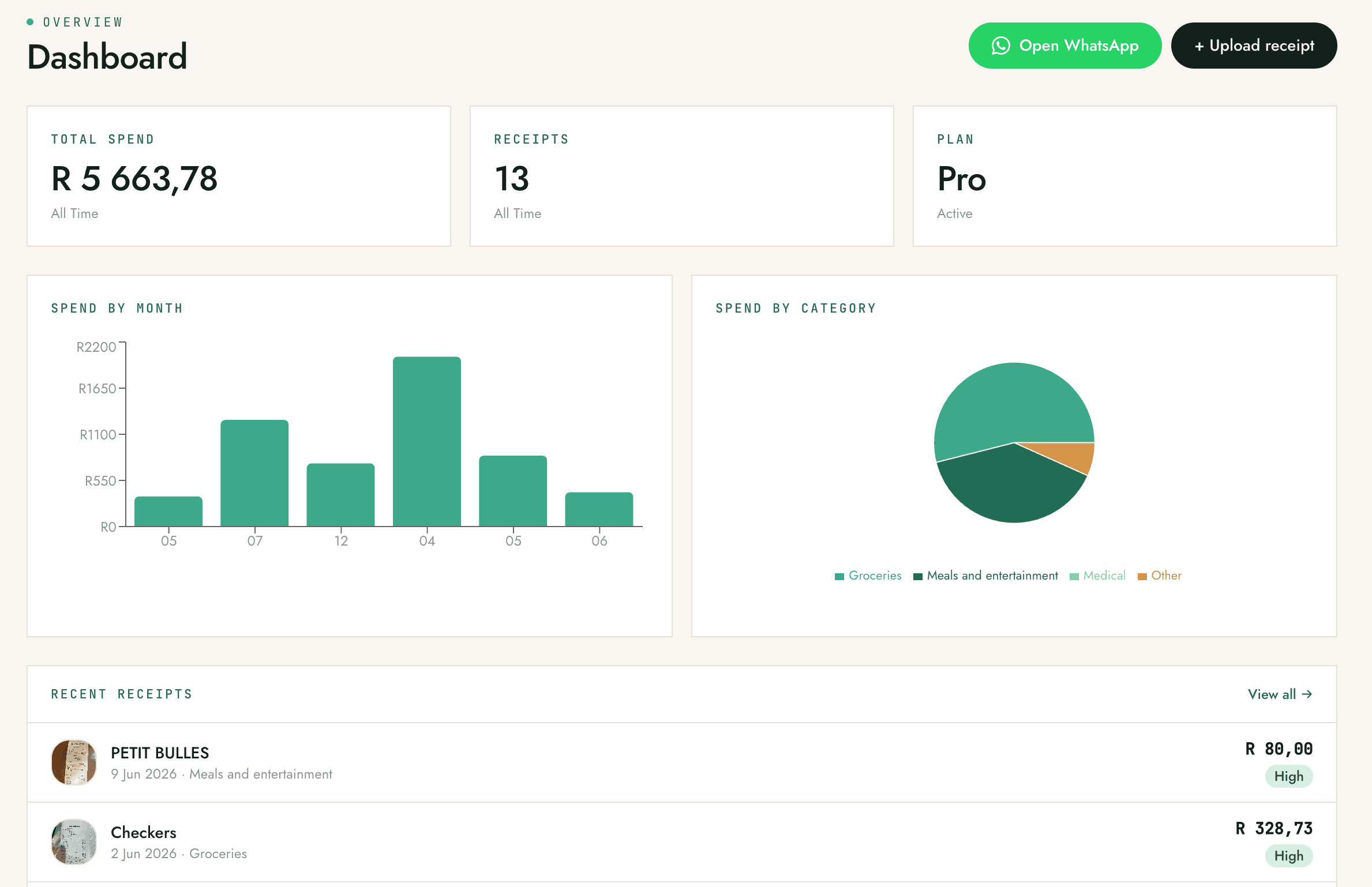
  • Spend by category. See where the money actually goes, broken down and totalled.
  • Always current. The dashboard updates the moment a new slip is processed.
  • Open WhatsApp anytime. Jump back to the chat or upload a receipt straight from the dashboard.
Snap-a-Slip dashboard showing total spend R5 663,78, 13 receipts, spend-by-month bar chart and spend-by-category pie chart.
The dashboard, updating in real time
Step 04Export anywhere

Hand it to your accountant, any way they want.

Download a CSV or a formatted PDF report, push live to Xero, or grab CSVs shaped for Sage and QuickBooks. Need the originals? Pull a ZIP of every receipt photo for the period.
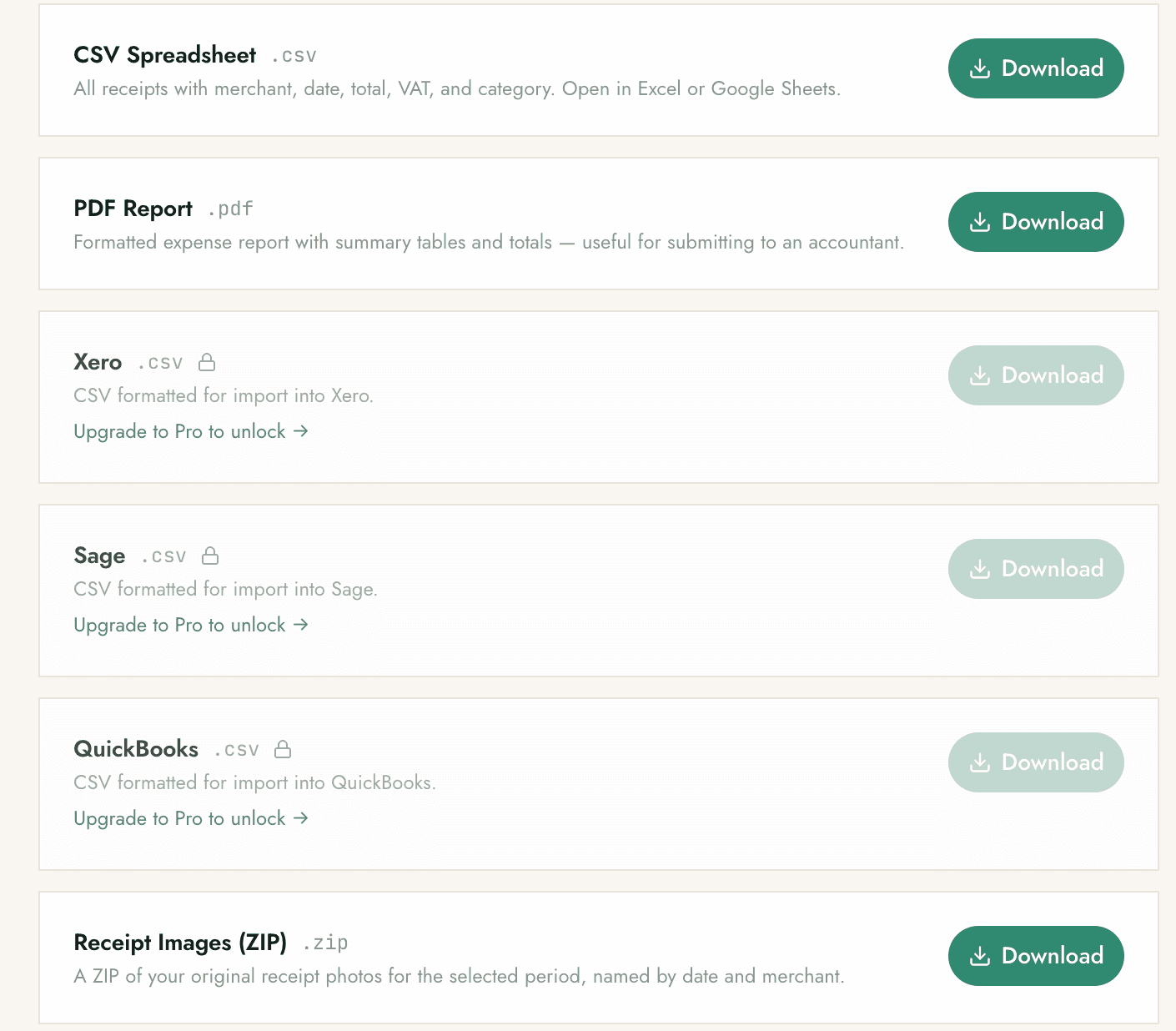
  • Live Xero. Slips arrive in Xero as draft bills with the source photo attached, ready for review.
  • CSV and PDF for everyone. Open in Excel or Google Sheets, or send the PDF straight to your bookkeeper.
  • Sage and QuickBooks. Export CSVs formatted to import cleanly into Sage and QuickBooks.
Snap-a-Slip export screen offering CSV, PDF report, Xero, Sage, QuickBooks and a ZIP of original receipt images.
CSV, PDF, Xero, Sage, QuickBooks, ZIP
Step 05Teams and accountants

Add your team or your bookkeeper.

Invite people by WhatsApp number and everyone snaps into the same workspace. Owners see team activity and spend per member. Your accountant gets their own login and your receipts in real time.
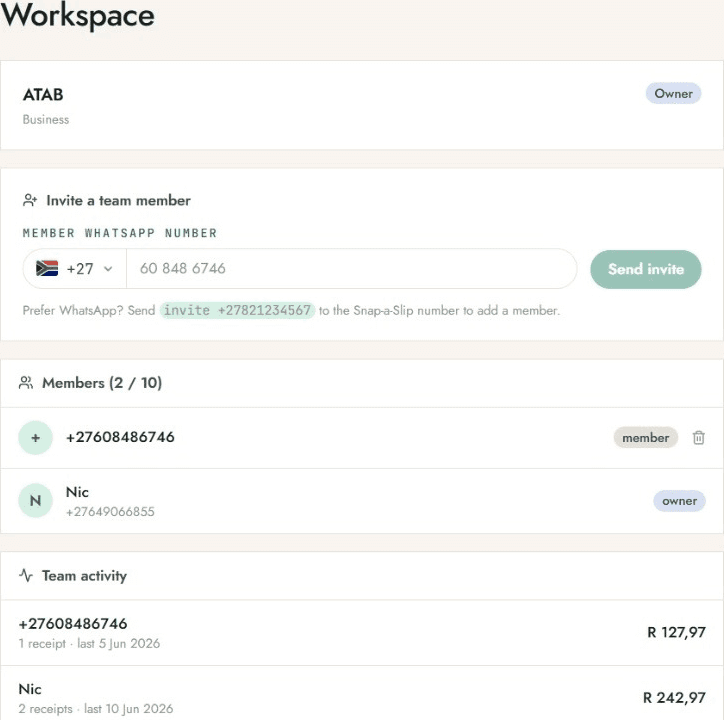
  • Invite by number. Send an invite to a teammate's WhatsApp number and they're in.
  • See who spent what. Team activity shows receipts and totals per member.
  • Bookkeeper access. Give your accountant a login to the same extracted slips, live.
Snap-a-Slip workspace screen showing a business with two members invited by WhatsApp number and team activity totals.
One workspace for the whole team
The detail

The bits that make it stick.

Reads any slip

Till receipts, fuel, parking, restaurant tabs, PDFs. Crooked, crumpled or faded, the OCR is tuned for SA vendors.

15% VAT, calculated

The VAT line is pulled out separately on every slip. Month-end and SARS submissions stop being a guessing game.

Confidence on every field

Each extracted value carries a confidence score, so you know which ones to glance at before you file.

Fix it in a tap

Wrong merchant or amount? Click the field on the dashboard and edit. The bot learns from your corrections.

Your receipts, kept

Originals stored while your account is active. Download a ZIP of every photo, named by date and merchant.

Cancel in one word

No contract, no lock-in. Type "cancel" on WhatsApp. Your data stays accessible through your final billing month.

Built for South Africa

Tax-ready, and yours to keep.

SARS-ready
Clear, unaltered photos that hold up at audit, with VAT split out for your return.
POPIA-compliant
A South African product built for local data rules. Export or delete everything anytime.
Your data, your call
Receipts are never sold or shared. Cancel and your data stays accessible through the month.
Pricing

Start free. Unlimited from R99.

Free for your first 15 receipts a month, resetting monthly. Upgrade when you outgrow it.

Most popular
Pro
R99
per month · billed monthly · VAT inclusive
  • Unlimited receipts via WhatsApp
  • Merchant, date, total, 15% VAT and line items
  • Auto-categorisation across all categories
  • Live Xero push, plus Sage and QuickBooks CSVs
  • CSV, PDF and receipt-image exports
  • Monthly spend summaries
  • POPIA-compliant data handling
Start free on WhatsApp
No card today · Cancel anytime
FAQ

Quick answers.

Do I need to download an app?

No. Snap-a-Slip lives entirely on WhatsApp. Save the number, send a slip, done. The dashboard is a website you only open when you want to review or export.

Will SARS accept a photo of my slip?

Yes. SARS accepts photographed receipts as long as they are clear, complete and legible at audit. A clean photo is often more readable than the original thermal slip, which fades over time.

Does it calculate VAT?

Yes, automatically. The 15% VAT breakdown is pulled out separately from the total on every extracted slip, which makes month-end and year-end VAT submission straightforward.

What if the AI gets something wrong?

Click into the field on the dashboard and edit it. A confidence score is shown next to every extracted field, so you know which ones to double-check first.

What does it cost?

Free for your first 15 receipts a month, which resets monthly. Pro is R99/month for unlimited receipts and all exports. Business is R399/month for up to 10 users. Enterprise is custom-priced for larger teams and multiple businesses, just get in touch.

Snap your first slip today.

Free for your first 15 receipts. No card, no signup form. Just a WhatsApp message.

Start free on WhatsApp